5 posts tagged with "Tech Insights"

View All Tags

Tech Insights

A data warehouse was defined by Bill Inmon as "a subject-oriented, integrated, nonvolatile, and time-variant collection of data in support of management's decisions" over 30 years ago. However, the initial data warehouses unable to store massive heterogeneous data, hence the creation of data lakes. In modern times, data lakehouse emerges as a new paradigm. It is an open data management architecture featured by strong data analytics and governance capabilities, high flexibility, and open storage.

If I could only use one word to describe the next-gen data lakehouse, it would be unification:

  • Unified data storage to avoid the trouble and risks brought by redundant storage and cross-system ETL.
  • Unified governance of both data and metadata with support for ACID, Schema Evolution, and Snapshot.
  • Unified data application that supports data access via a single interface for multiple engines and workloads.

Let's look into the architecture of a data lakehouse. We will find that it is not only supported by table formats such as Apache Iceberg, Apache Hudi, and Delta Lake, but more importantly, it is powered by a high-performance query engine to extract value from data.

Users are looking for a query engine that allows quick and smooth access to the most popular data sources. What they don't want is for their data to be locked in a certain database and rendered unavailable for other engines or to spend extra time and computing costs on data transfer and format conversion.

To turn these visions into reality, a data query engine needs to figure out the following questions:

  • How to access more data sources and acquire metadata more easily?
  • How to improve query performance on data coming from various sources?
  • How to enable more flexible resource scheduling and workload management?

Apache Doris provides a possible answer to these questions. It is a real-time OLAP database that aspires to build itself into a unified data analysis gateway. This means it needs to be easily connected to various RDBMS, data warehouses, and data lake engines (such as Hive, Iceberg, Hudi, Delta Lake, and Flink Table Store) and allow for quick data writing from and queries on these heterogeneous data sources. The rest of this article is an in-depth explanation of Apache Doris' techniques in the above three aspects: metadata acquisition, query performance optimization, and resource scheduling.

Metadata Acquisition and Data Access

Apache Doris 1.2.2 supports a wide variety of data lake formats and data access from various external data sources. Besides, via the Table Value Function, users can analyze files in object storage or HDFS directly.
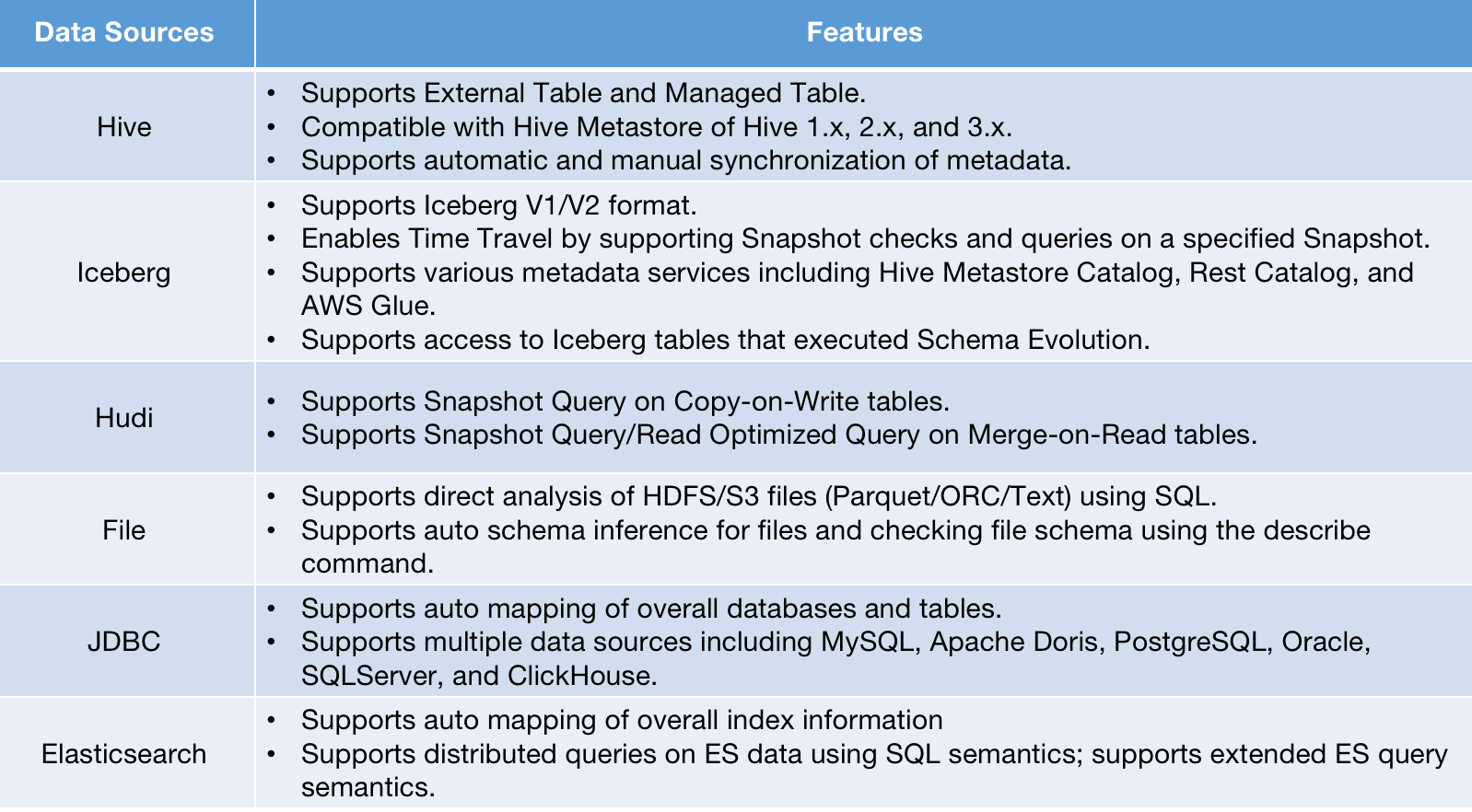
To support multiple data sources, Apache Doris puts efforts into metadata acquisition and data access.

Metadata Acquisition

Metadata consists of information about the databases, tables, partitions, indexes, and files from the data source. Thus, metadata of various data sources come in different formats and patterns, adding to the difficulty of metadata connection. An ideal metadata acquisition service should include the following:

  1. A metadata structure that can accommodate heterogeneous metadata.
  2. An extensible metadata connection framework that enables quick and low-cost data connection.
  3. Reliable and efficient metadata access that supports real-time metadata capture.
  4. Custom authentication services to interface with external privilege management systems and thus reduce migration costs.

Metadata Structure

Older versions of Doris support a two-tiered metadata structure: database and table. As a result, users need to create mappings for external databases and tables one by one, which is heavy work. Thus, Apache Doris 1.2.0 introduced the Multi-Catalog functionality. With this, you can map to external data at the catalog level, which means:

  1. You can map to the whole external data source and ingest all metadata from it.
  2. You can manage the properties of the specified data source at the catalog level, such as connection, privileges, and data ingestion details, and easily handle multiple data sources.
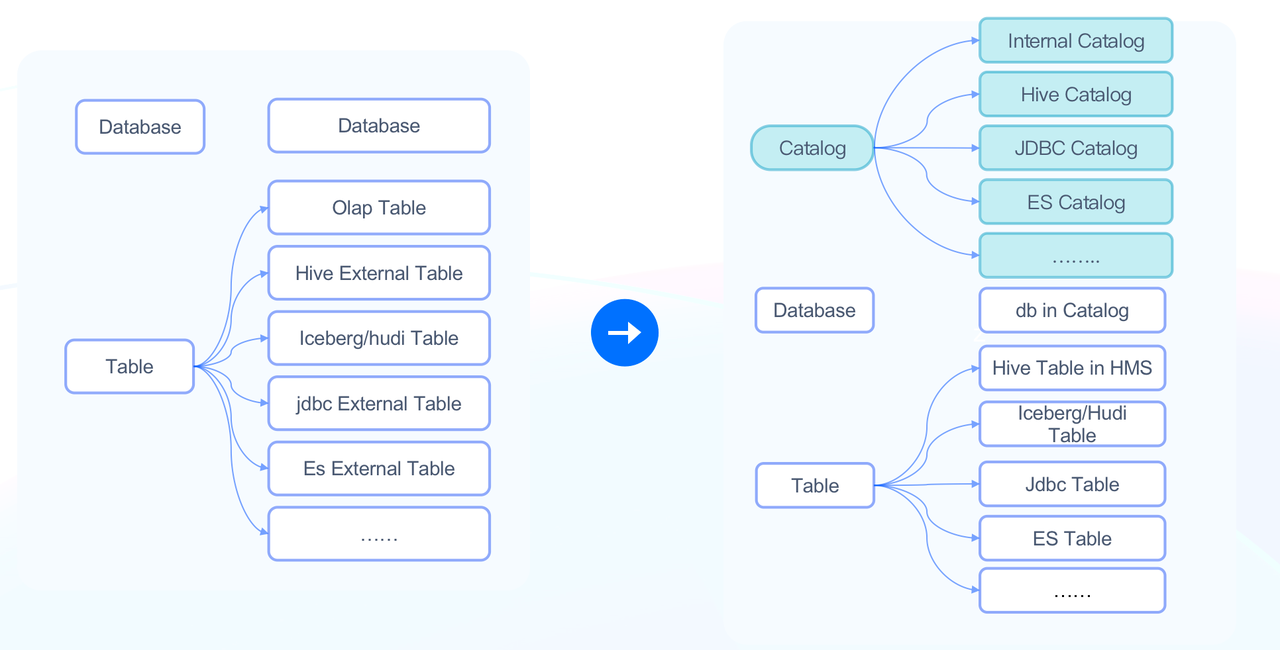
Data in Doris falls into two types of catalogs:

  1. Internal Catalog: Existing Doris databases and tables all belong to the Internal Catalog.
  2. External Catalog: This is used to interface with external data sources. For example, HMS External Catalog can be connected to a cluster managed by Hive Metastore, and Iceberg External Catalog can be connected to an Iceberg cluster.

You can use the SWITCH statement to switch catalogs. You can also conduct federated queries using fully qualified names. For example:

SELECT * FROM hive.db1.tbl1 a JOIN iceberg.db2.tbl2 b
ON a.k1 = b.k1;

See more details here.

Extensible Metadata Connection Framework

The introduction of the catalog level also enables users to add new data sources simply by using the CREATE CATALOG statement:

CREATE CATALOG hive PROPERTIES (
'type'='hms',
'hive.metastore.uris' = 'thrift://172.21.0.1:7004',
);

In data lake scenarios, Apache Doris currently supports the following metadata services:

  • Hive Metastore-compatible metadata services
  • Alibaba Cloud Data Lake Formation
  • AWS Glue

This also paves the way for developers who want to connect to more data sources via External Catalog. All they need is to implement the access interface.

Efficient Metadata Access

Access to external data sources is often hindered by network conditions and data resources. This requires extra efforts of a data query engine to guarantee reliability, stability, and real-timeliness in metadata access.
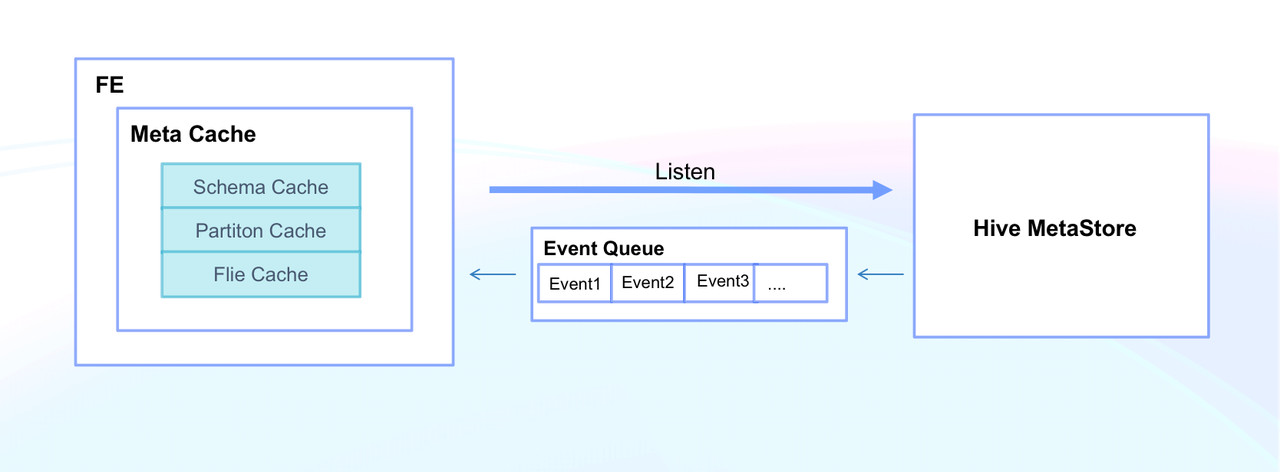
Doris enables high efficiency in metadata access by Meta Cache, which includes Schema Cache, Partition Cache, and File Cache. This means that Doris can respond to metadata queries on thousands of tables in milliseconds. In addition, Doris supports manual refresh of metadata at the Catalog/Database/Table level. Meanwhile, it enables auto synchronization of metadata in Hive Metastore by monitoring Hive Metastore Event, so any changes can be updated within seconds.

Custom Authorization

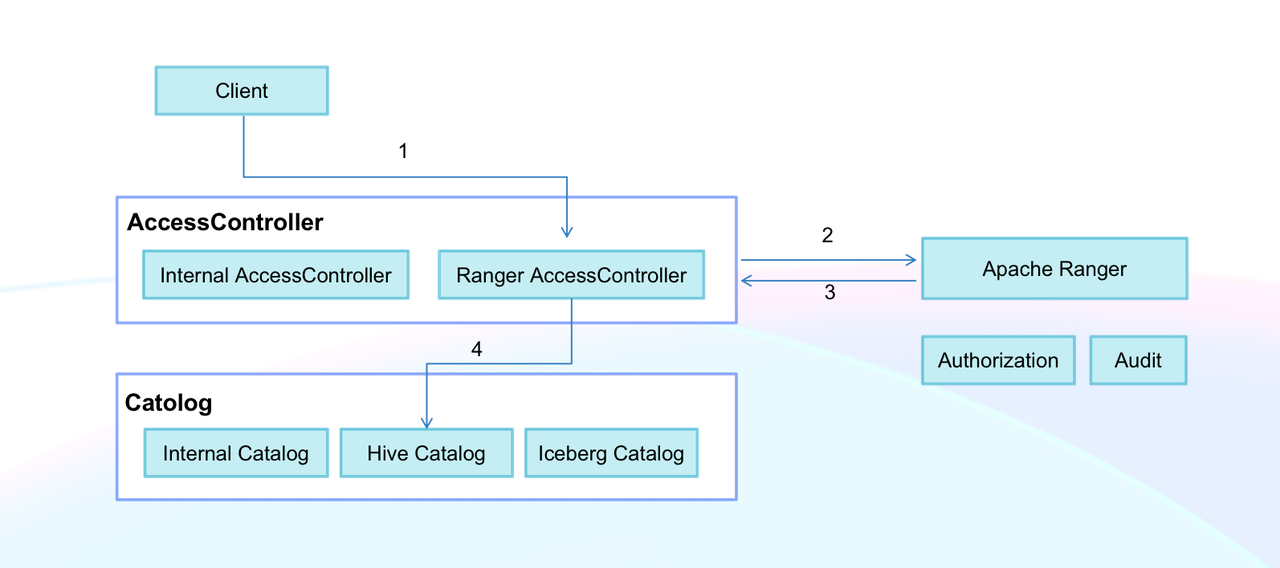
External data sources usually come with their own privilege management services. Many companies use one single tool (such as Apache Ranger) to provide authorization for their multiple data systems. Doris supports a custom authorization plugin, which can be connected to the user's own privilege management system via the Doris Access Controller interface. As a user, you only need to specify the authorization plugin for a newly created catalog, and then you can readily perform authorization, audit, and data encryption on external data in Doris.
Data Access

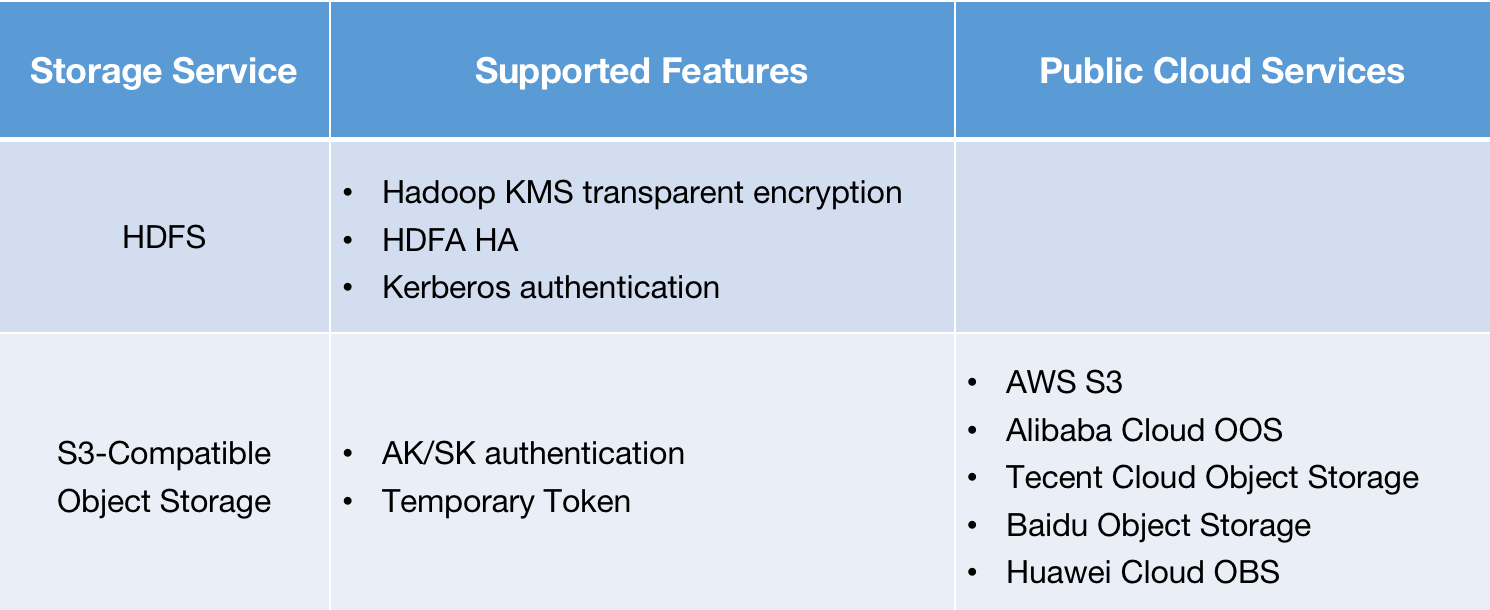
Doris supports data access to external storage systems, including HDFS and S3-compatible object storage:
Query Performance Optimization

After clearing the way for external data access, the next step for a query engine would be to accelerate data queries. In the case of Apache Doris, efforts are made in data reading, execution engine, and optimizer.

Data Reading

Reading data on remote storage systems is often bottlenecked by access latency, concurrency, and I/O bandwidth, so reducing reading frequency will be a better choice.

Native File Format Reader

Improving data reading efficiency entails optimizing the reading of Parquet files and ORC files, which are the most commonly seen data files. Doris has refactored its File Reader, which is fine-tuned for each data format. Take the Native Parquet Reader as an example:

  • Reduce format conversion: It can directly convert files to the Doris storage format or to a format of higher performance using dictionary encoding.
  • Smart indexing of finer granularity: It supports Page Index for Parquet files, so it can utilize Page-level smart indexing to filter Pages.
  • Predicate pushdown and late materialization: It first reads columns with filters first and then reads the other columns of the filtered rows. This remarkably reduces file read volume since it avoids reading irrelevant data.
  • Lower read frequency: Building on the high throughput and low concurrency of remote storage, it combines multiple data reads into one in order to improve overall data reading efficiency.

File Cache

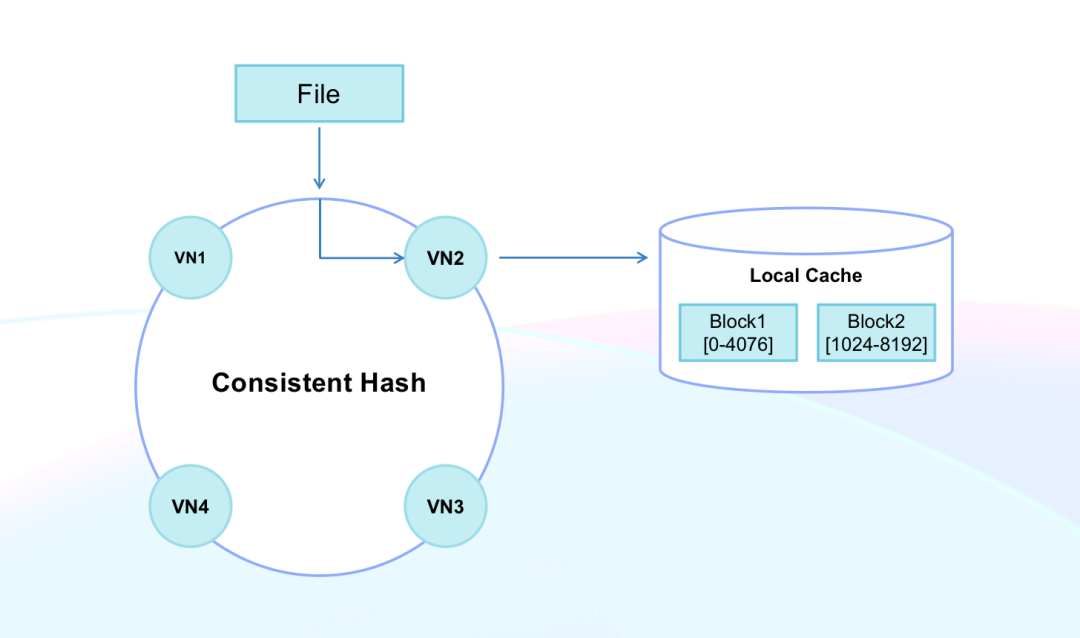
Doris caches files from remote storage in local high-performance disks as a way to reduce overhead and increase performance in data reading. In addition, it has developed two new features that make queries on remote files as quick as those on local files:

  1. Block cache: Doris supports the block cache of remote files and can automatically adjust the block size from 4KB to 4MB based on the read request. The block cache method reduces read/write amplification and read latency in cold caches.
  2. Consistent hashing for caching: Doris applies consistent hashing to manage cache locations and schedule data scanning. By doing so, it prevents cache failures brought about by the online and offlining of nodes. It can also increase cache hit rate and query service stability.
Execution Engine

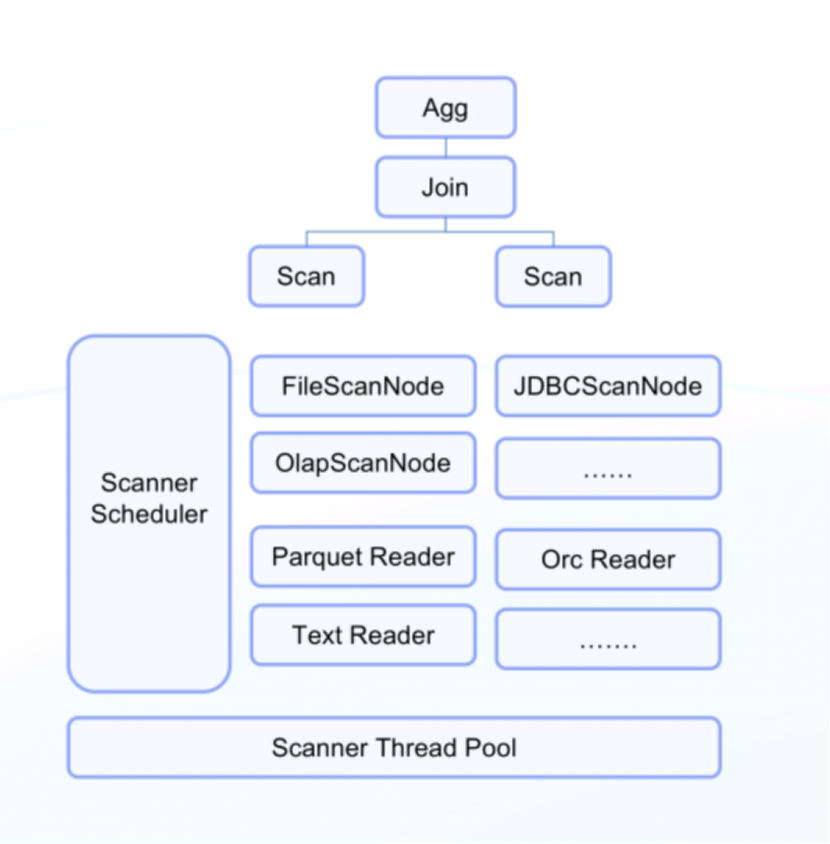
Developers surely don't want to rebuild all the general features for every new data source. Instead, they hope to reuse the vectorized execution engine and all operators in Doris in the data lakehouse scenario. Thus, Doris has refactored the scan nodes:

  • Layer the logic: All data queries in Doris, including those on internal tables, use the same operators, such as Join, Sort, and Agg. The only difference between queries on internal and external data lies in data access. In Doris, anything above the scan nodes follows the same query logic, while below the scan nodes, the implementation classes will take care of access to different data sources.
  • Use a general framework for scan operators: Even for the scan nodes, different data sources have a lot in common, such as task splitting logic, scheduling of sub-tasks and I/O, predicate pushdown, and Runtime Filter. Therefore, Doris uses interfaces to handle them. Then, it implements a unified scheduling logic for all sub-tasks. The scheduler is in charge of all scanning tasks in the node. With global information of the node in hand, the schedular is able to do fine-grained management. Such a general framework makes it easy to connect a new data source to Doris, which will only take a week of work for one developer.
Query Optimizer

Doris supports a range of statistical information from various data sources, including Hive Metastore, Iceberg Metafile, and Hudi MetaTable. It has also refined its cost model inference based on the characteristics of different data sources to enhance its query planning capability.

Performance

We tested Doris and Presto/Trino on HDFS in flat table scenarios (ClickBench) and multi-table scenarios (TPC-H). Here are the results:

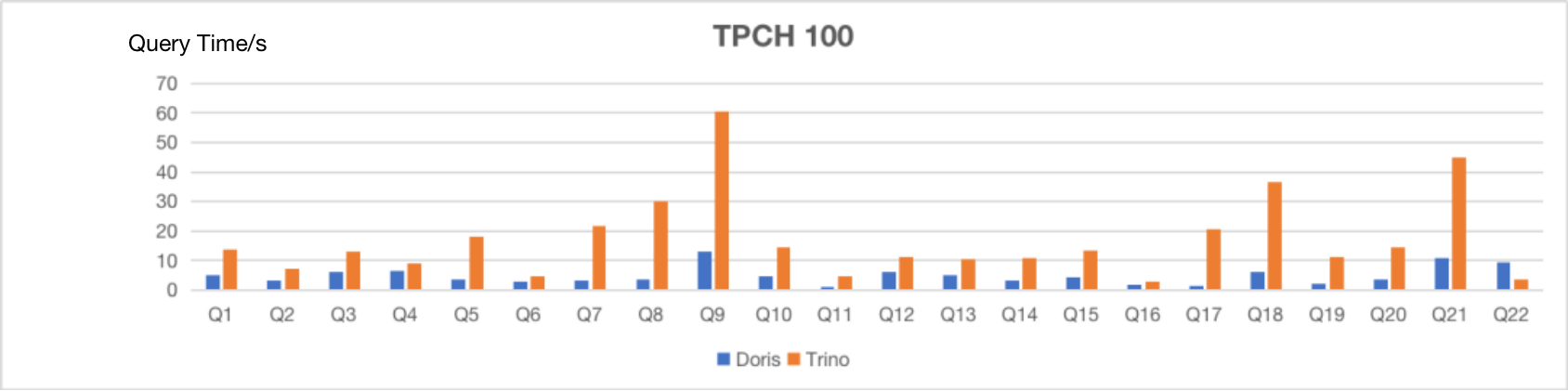
As is shown, with the same computing resources and on the same dataset, Apache Doris takes much less time to respond to SQL queries in both scenarios, delivering a 3~10 times higher performance than Presto/Trino.

Workload Management and Elastic Computing

Querying external data sources requires no internal storage of Doris. This makes elastic stateless computing nodes possible. Apache Doris 2.0 is going to implement Elastic Compute Node, which is dedicated to supporting query workloads of external data sources.
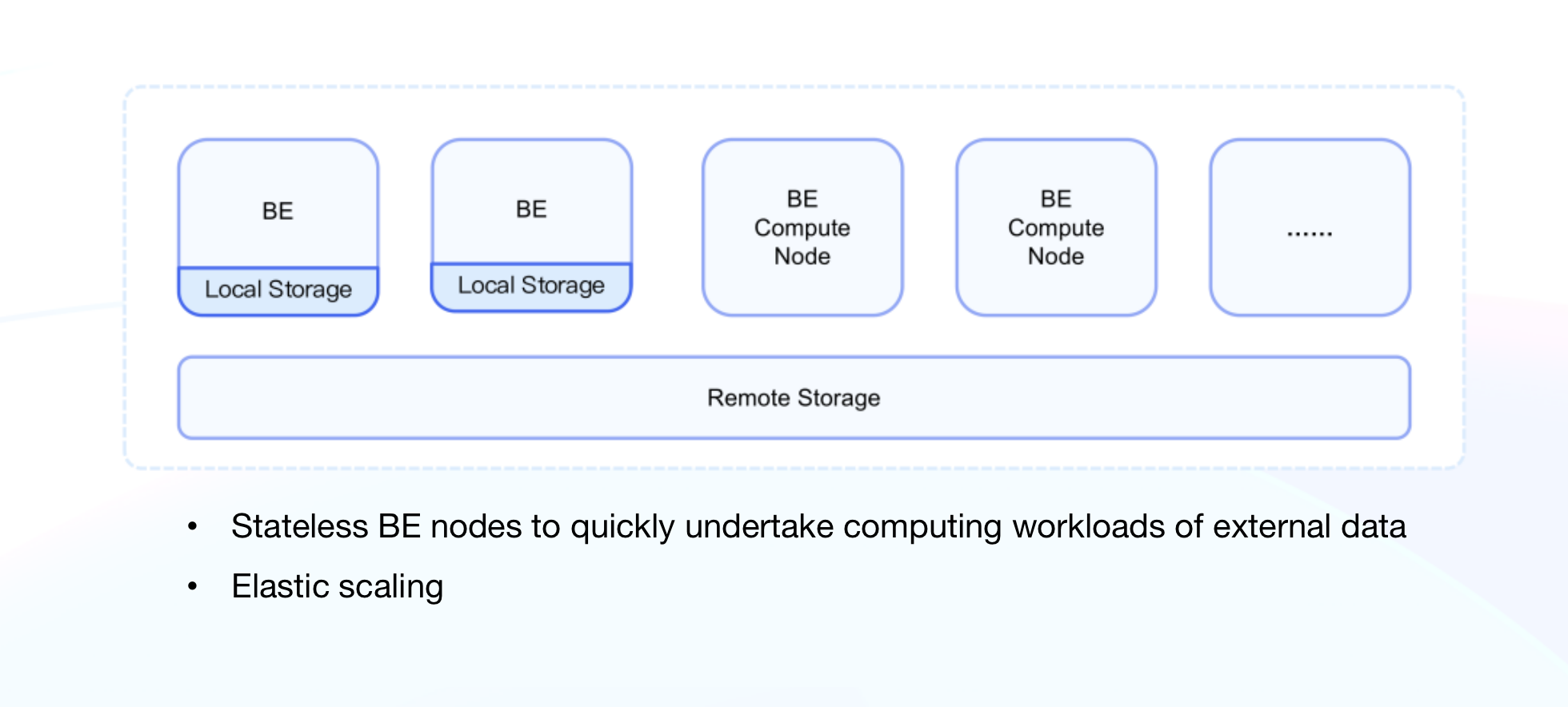
Stateless computing nodes are open for quick scaling so users can easily cope with query workloads during peaks and valleys and strike a balance between performance and cost. In addition, Doris has optimized itself for Kubernetes cluster management and node scheduling. Now Master nodes can automatically manage the onlining and offlining of Elastic Compute Nodes, so users can govern their cluster workloads in cloud-native and hybrid cloud scenarios without difficulty.

Use Case

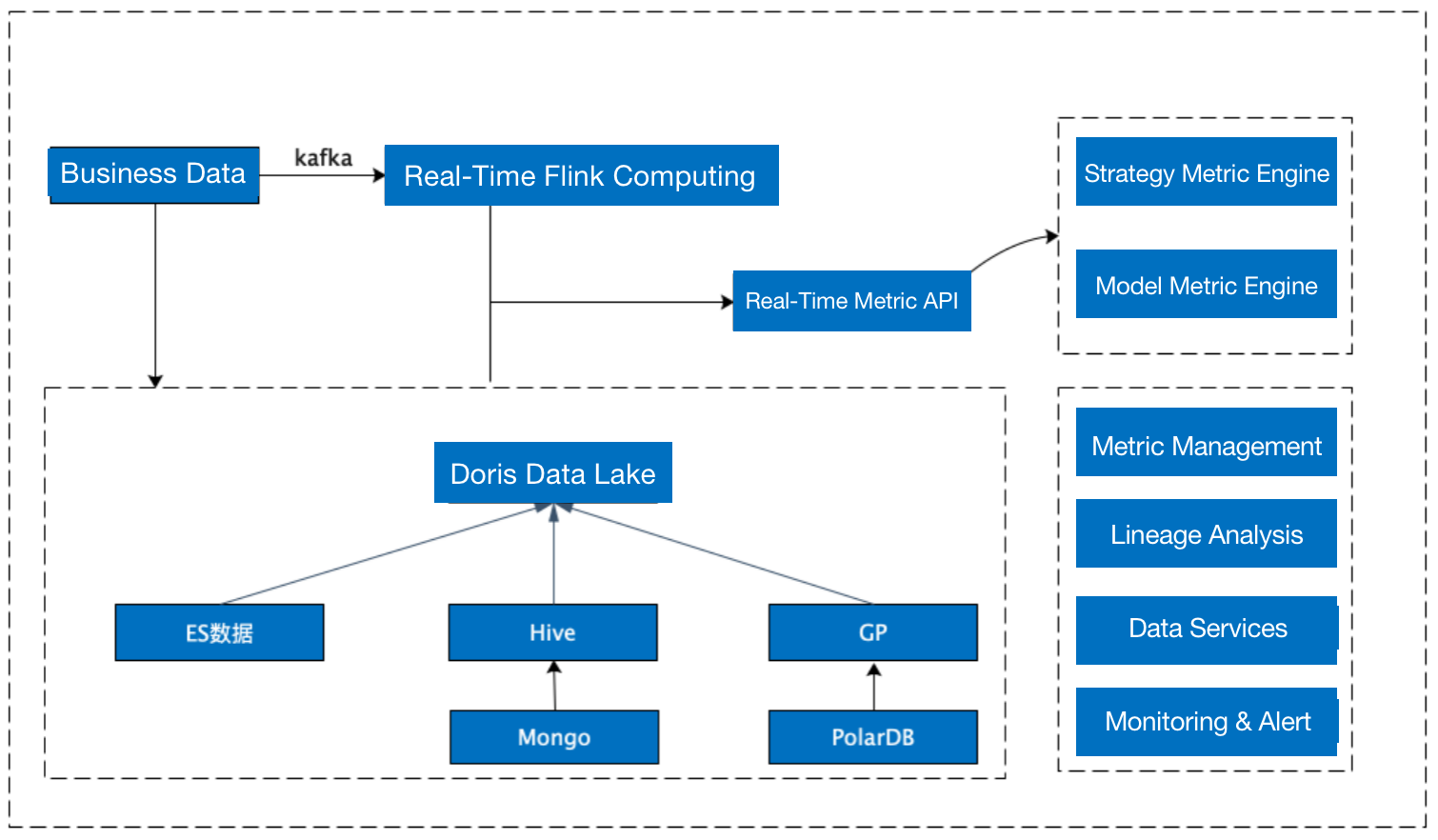
Apache Doris has been adopted by a financial institution for risk management. The user's high demands for data timeliness makes their data mart built on Greenplum and CDH, which could only process data from one day ago, no longer a great fit. In 2022, they incorporated Apache Doris in their data production and application pipeline, which allowed them to perform federated queries across Elasticsearch, Greenplum, and Hive. A few highlights from the user's feedback include:

  • Doris allows them to create one Hive Catalog that maps to tens of thousands of external Hive tables and conducts fast queries on them.
  • Doris makes it possible to perform real-time federated queries using Elasticsearch Catalog and achieve a response time of mere milliseconds.
  • Doris enables the decoupling of daily batch processing and statistical analysis, bringing less resource consumption and higher system stability.
Future Plans

Apache Doris is going to support a wider range of data sources, improve its data reading and write-back functionality, and optimizes its resource isolation and scheduling.

More Data Sources

We are working closely with various open source communities to expand and improve Doris' features in data lake analytics. We plan to provide:

  • Support for Incremental Query of Hudi Merge-on-Read tables;
  • Lower query latency utilizing the indexing of Iceberg/Hudi in combination with the query optimizer;
  • Support for more data lake formats such as Delta Lake and Flink Table Store.

Data Integration

Data reading:

Apache Doris is going to:

  • Support CDC and Incremental Materialized Views for data lakes in order to provide users with near real-time data views;
  • Support a Git-Like data access mode and enable easier and safer data management via the multi-version and Branch mechanisms.

Data Write-Back:

We are going to enhance Apache Doris' data analysis gateway. In the future, users will be able to use Doris as a unified data management portal that is in charge of the write-back of processed data, export of data, and the generation of a unified data view.

Resource Isolation & Scheduling

Apache Doris is undertaking a wider variety of workloads as it is interfacing with more and more data sources. For example, it needs to provide low-latency online services while batch processing T-1 data in Hive. To make it work, resource isolation within the same cluster is critical, which is where efforts will be made.

Meanwhile, we will continue optimizing the scheduling logic of elastic computing nodes in various scenarios and develop intra-node resource isolation at a finer granularity, such as CPU, I/O, and memory.

Join us

Contact dev@apache.doris.org to join the Lakehouse SIG(Special Interest Group) in the Apache Doris community and talk to developers from all walks of life.

Tech Insights

BEIJING--(BUSINESS WIRE)--Beijing Flywheel Data Technology Co., Ltd officially launched SelectDB Cloud – a new cloud data warehouse designed to help organizations boost their data analytics effectiveness. It is a cloud native real-time data warehouse based on the open resource database Apache Doris, and features easy-to-use, high-performance and single unified. SelectDB Cloud is available on multiple clouds and till now it has been launched on AWS, Alibaba Cloud, Tencent Cloud, and Huawei Cloud.

Firstly, the founder and CEO of SelectDB Mr. Lian gave a presentation about the characteristics of SelectDB Cloud.

SelectDB Cloud is high-performance. The data showed in the wide table aggregation scenario, by SSB flat testing, the performance of SelectDB Cloud is 3.4 times that of ClickHouse, 92 times that of Presto, and 6 times that of Snowflake. In the multi-table association scenario, by TPC-H sf100 testing, the performance of SelectDB Cloud is 1.5 times that of Redshift, 49 times that of ClickHouse, and 2.5 times that of Snowflake.

SelectDB Cloud is cost-effective. As evaluated, the cost of SelectDB Cloud was only 1/2-1/5 of the cost of other privatization deployment products.

SelectDB Cloud is single unified. As evaluated, SelectDB Cloud is 54 times that of Hive, 12 times that of Spark; SelectDB Cloud can achieve 4.2 times write speed, 2.3 times query speed, and only 1/5 disk space occupation compared with ElasticSearch in typical scenarios for log storage analysis.

Additionally, SelectDB Cloud is compatible with MySQL connection protocol, has safe and convenient connection methods, rich data import methods, hierarchical user permission system, simple and convenient management console for administrators, as well as open source, multi-cloud and other features, which can well meet the needs of users in many industries, especially those in traditional industries.

Then the Vice President of Technology Mr. Xiao introduced four highly customized solutions for core data analysis scenarios proposed by SelectDB, that is modern data platform solution for company operation; reporting and analysis solution for business; user profile and behavior analysis solution; log storage and analysis solution. Finally, Mr. Lian announced the official launch of SelectDB Partners Program to welcome more partners to join them to create value for customers.

If you want to inquire about relevant products and technologies, please contact us via marketing@selectdb.com. We will arrange professional technicians to contact you as soon as possible.

Tech Insights

Leads

Apache Doris uses the C++ language to develop its execution engine. One of the most important factors affecting the efficiency of C++ development is the use of pointers, including illegal accesses, leaks, and forced type conversions. In this article, we will introduce the Sanitizer and Core Dump analysis tools to share how to quickly locate C++ problems in Apache Doris and help developers improve their development efficiency and master more effective development techniques.

Background

Apache Doris is a high-performance MPP analytical database. For performance reasons, Apache Doris uses the C++ language to implement its execution engine. In C++ development, one of the most important factors affecting development efficiency is the use of pointers, including illegal accesses, leaks, forced type conversions, etc. Google Sanitizer is a tool designed by Google for dynamic code analysis, and when Apache Doris development encounters memory problems caused by the use of pointers, it is thanks to Sanitizer makes it possible to improve the efficiency of problem solving. In addition, Core Dump files are a very effective way to locate and reproduce problems when some memory out-of-bounds or illegal accesses cause BE processes to crash, so an efficient tool to analyze CoreDump will further help locate the problem more quickly.

In this article, we will introduce the Sanitizer and Core Dump analysis tools to share how to quickly locate C++ problems in Apache Doris and help developers improve their development efficiency and acquire more effective development skills.

Introduction to Sanitizer

There are two tools commonly used to locate memory problems in C++ programs, Valgrind and Sanitizer。

A comparison of the two can be found at https://developers.redhat.com/blog/2021/05/05/memory-error-checking-in-c-and-c-comparing-sanitizers-and-valgrind

Valgrind translates the execution of binary instructions through the runtime software to obtain the relevant information, so Valgrind degrades the performance of the program very significantly, which makes it inefficient to use Valgrind to locate memory problems in some large projects such as Apache Doris.

Sanitizer, on the other hand, captures relevant information by inserting code at compile time, with much less performance degradation than Valgrind, so Saintizer is used by default for Apache Doris single tests and other test environments.

Sanitizer's algorithm can be found at https://github.com/google/sanitizers/wiki/AddressSanitizerAlgorithm

During the development of Apache Doris, we usually use the Sanirizer to locate memory problems. there are several Sanitizers for LLVM and GNU C++:

  • AddressSanitizer (ASan) can find memory error problems,such as use after free,heap buffer overflow,stack buffer overflow,global buffer overflow,use after return,use after scope,memory leak,super large memory allocation etc.;
  • AddressSanitizerLeakSanitizer (LSan) can find memory leaks;
  • MemorySanitizer (MSan) can find uninitialized memory usage;
  • UndefinedBehaviorSanitizer (UBSan) can find undefined behaviour, such as out-of-bounds array accesses, value overflows, etc.;
  • ThreadSanitizer (TSan) can find the competing behaviour of threads.

Among them, AddressSanitizer, AddressSanitizerLeakSanitizer and UndefinedBehaviorSanitizer are the most effective for solving pointer-related problems.

Sanitizer not only finds errors, but also gives the source of the error and the location of the code, which makes problem solving very efficient, as illustrated by some examples of how easy Sanitizer is to use.

You can refer here to use Sanitizer https://github.com/apache/doris/blob/master/be/CMakeLists.txt

Sanitizer and CoreDump work together to locate memory problems very efficiently. By default, it does not generate Core Dump files, you can use the following environment variables to generate Core Dump files, and it is recommended to open them by default.

Reference can be made to https://github.com/apache/doris/blob/master/bin/start_be.sh

export ASAN_OPTIONS=symbolize=1:abort_on_error=1:disable_coredump=0:unmap_shadow_on_exit=1

Use the following environment variables to make UBSan generate the code stack, which is not generated by default.

export UBSAN_OPTIONS=print_stacktrace=1

Sometimes it is necessary to display the location of the specified Symbolizer binary so that Sanitizer can generate a readable code stack directly.

export ASAN_SYMBOLIZER_PATH=your path of llvm-symbolizer

Examples of Sanitizer usage

Use after free

User after free refers to access to freed memory. For use after free errors, AddressSanitizer can report the code stack using the freed address, the code stack for address allocation, and the code stack for address release. For example, in https://github.com/apache/doris/issues/9525, the code stack using the release address is as follows.

82849==ERROR: AddressSanitizer: heap-use-after-free on address 0x60300074c420 at pc 0x56510f61a4f0 bp 0x7f48079d89a0 sp 0x7f48079d8990
READ of size 1 at 0x60300074c420 thread T94 (MemTableFlushTh)
#0 0x56510f61a4ef in doris::faststring::append(void const*, unsigned long) /mnt/ssd01/tjp/incubator-doris/be/src/util/faststring.h:120
// For a more detailed code stack please go to [<https://github.com/apache/doris/issues/9525>](https://github.com/apache/doris/issues/9525) to view

The code stack for the initial assignment of this address is as follows.

previously allocated by thread T94 (MemTableFlushTh) here:
#0 0x56510e9b74b7 in __interceptor_malloc (/mnt/ssd01/tjp/regression_test/be/lib/palo_be+0x536a4b7)
#1 0x56510ee77745 in Allocator<false, false>::alloc_no_track(unsigned long, unsigned long) /mnt/ssd01/tjp/incubator-doris/be/src/vec/common/allocator.h:223
#2 0x56510ee68520 in Allocator<false, false>::alloc(unsigned long, unsigned long) /mnt/ssd01/tjp/incubator-doris/be/src/vec/common/allocator.h:104

The code stack for address release is as follows.

0x60300074c420 is located 16 bytes inside of 32-byte region [0x60300074c410,0x60300074c430)
freed by thread T94 (MemTableFlushTh) here:
#0 0x56510e9b7868 in realloc (/mnt/ssd01/tjp/regression_test/be/lib/palo_be+0x536a868)
#1 0x56510ee8b913 in Allocator<false, false>::realloc(void*, unsigned long, unsigned long, unsigned long) /mnt/ssd01/tjp/incubator-doris/be/src/vec/common/allocator.h:125
#2 0x56510ee814bb in void doris::vectorized::PODArrayBase<1ul, 4096ul, Allocator<false, false>, 15ul, 16ul>::realloc<>(unsigned long) /mnt/ssd01/tjp/incubator-doris/be/src/vec/common/pod_array.h:147

With a detailed illegal access to the address code stack, allocation code stack, and release code stack, the problem will be very easy to locate.

Note: Due to the length of the article, the stack in the example is not fully displayed.

heap buffer overflow

AddressSanitizer can report the code stack of heap buffer overflow.

For example, from https://github.com/apache/doris/issues/5951 combined with the Core Dump file generated at runtime, you can quickly locate the problem.

==3930==ERROR: AddressSanitizer: heap-buffer-overflow on address 0x60c000000878 at pc 0x000000ae00ce bp 0x7ffeb16aa660 sp 0x7ffeb16aa658
READ of size 8 at 0x60c000000878 thread T0
#0 0xae00cd in doris::StringFunctions::substring(doris_udf::FunctionContext*, doris_udf::StringVal const&, doris_udf::IntVal const&, doris_udf::IntVal const&) ../src/exprs/string_functions.cpp:98

memory leak

AddressSanitizer is able to report where the allocated memory is not freed, so that the cause of the leak can be quickly analyzed.

==1504733==ERROR: LeakSanitizer: detected memory leaks
Direct leak of 688128 byte(s) in 168 object(s) allocated from:
#0 0x560d5db51aac in __interceptor_posix_memalign (/mnt/ssd01/doris-master/VEC_ASAN/be/lib/doris_be+0x9227aac)
#1 0x560d5fbb3813 in doris::CoreDataBlock::operator new(unsigned long) /home/zcp/repo_center/doris_master/be/src/util/core_local.cpp:35
#2 0x560d5fbb65ed in doris::CoreDataAllocatorImpl<8ul>::get_or_create(unsigned long) /home/zcp/repo_center/doris_master/be/src/util/core_local.cpp:58
#3 0x560d5e71a28d in doris::CoreLocalValue::CoreLocalValue(long)

https://github.com/apache/doris/issues/10926

https://github.com/apache/doris/pull/3326

Exception Distribution

AddressSanitizer will report an OOM error for allocating too much memory, and the stack and Core Dump file can be used to analyze where too much memory has been allocated. An example of the stack is as follows

img

Fix PR: https://github.com/apache/doris/pull/10289

UBSan can efficiently find errors in forced type conversions, as described in the following Issue link, and it can precisely describe the code that brings errors in forced type conversions, which can be more difficult to locate subsequently due to pointer misuse if such errors are not found in the first place.

Issue:https://github.com/apache/doris/issues/9105

UndefinedBehaviorSanitizer is also easier to find deadlocks than AddressSanitizer and others.

Such as https://github.com/apache/doris/issues/10309

Use of AddressSanitizer when maintaining memory pools for programs

The AddressSanitizer is used by the compiler to generate additional code for memory allocation, release, and access to implement memory problem analysis. If the program maintains its own memory pool, the AddressSanitizer cannot detect illegal accesses to memory in the pool. In this case, some additional work needs to be done to make AddressSanitizer work as much as possible, mainly using ASAN_POISON_MEMORY_REGION and ASAN_UNPOISON_MEMORY_REGION to manage memory accessibility, which is more difficult to use because AddressSanitizer has internal handling of address alignment, etc. For performance and memory release reasons, Apache Doris also maintains a memory allocation pool, and this approach does not ensure that AddressSanitizer will find all problems.

Reference can be made to https://github.com/apache/doris/pull/8148

When an application maintains its own memory pool, the use after free error becomes use after poison according to the method in https://github.com/apache/dorisw/pull/8148. However, use after poison does not give the stack where the address fails https://github.com/google/sanitizers/issues/191 , which makes it still difficult to locate and analyze the problem.

Therefore, it is recommended that the memory pool maintained by the program be turned off with an option so that the AddressSanitizer can be used to efficiently locate memory problems in the test environment.

Core dump analysis tool

A common problem in analyzing Core Dump files generated by C++ programs is how to print out the values of the STL containers and the values of the containers in Boost, and there are three tools to efficiently view the values of the STL and Boost containers.

STL-View

You can use STL-View by placing this file https://github.com/dataroaring/tools/blob/main/gdb/dbinit_stl_views-1.03.txt in ~/.gdbinit. STL-View output is very friendly and supports pvector, plist, plist_member, pmap, pmap_member, pset, pdequeue, pstack, pqueue, ppqueue, pbitset, pstring, pwstring. As an example, pvector is used in Apache Doris. It can output all the elements in a vector.

(gdb) pvector block.data
elem[0]: $5 = {
column = {
<COW<doris::vectorized::IColumn>::intrusive_ptr<doris::vectorized::IColumn const>> = {
t = 0x606000fdc820
}, <No data fields>},
type = {
<std::__shared_ptr<doris::vectorized::IDataType const, (__gnu_cxx::_Lock_policy)2>> = {
<std::__shared_ptr_access<doris::vectorized::IDataType const, (__gnu_cxx::_Lock_policy)2, false, false>> = {<No data fields>},
members of std::__shared_ptr<doris::vectorized::IDataType const, (__gnu_cxx::_Lock_policy)2>:
_M_ptr = 0x6030069e9780,
_M_refcount = {
_M_pi = 0x6030069e9770
}
}, <No data fields>},
name = {
static npos = 18446744073709551615,
_M_dataplus = {
<std::allocator<char>> = {
<__gnu_cxx::new_allocator<char>> = {<No data fields>}, <No data fields>},
members of std::__cxx11::basic_string<char, std::char_traits<char>, std::allocator<char> >::_Alloc_hider:
_M_p = 0x61400006e068 "n_nationkey"
},
_M_string_length = 11,
{
_M_local_buf = "n_nationkey\000\276\276\276\276",
_M_allocated_capacity = 7957695015158701934
}
}
}
elem[1]: $6 = {
column = {
<COW<doris::vectorized::IColumn>::intrusive_ptr<doris::vectorized::IColumn const>> = {
t = 0x6080001ec220
}, <No data fields>},
type = {
...

Pretty-Printer

GCC 7.0 now supports Pretty-Printer to print STL containers, you can place the following code in ~/.gdbinit to make Pretty-Printer work.

Note: /usr/share/gcc/python needs to be replaced with its local counterpart.

python
import sys
sys.path.insert(0, '/usr/share/gcc/python')
from libstdcxx.v6.printers import register_libstdcxx_printers
register_libstdcxx_printers (None)
end

Pretty-Printer can print out the details of a vector, for example.

(gdb) p block.data
$1 = std::vector of length 7, capacity 8 = {{
column = {
<COW<doris::vectorized::IColumn>::intrusive_ptr<doris::vectorized::IColumn const>> = {
t = 0x606000fdc820
}, <No data fields>},
type = std::shared_ptr<const doris::vectorized::IDataType> (use count 1, weak count 0) = {
get() = 0x6030069e9780
},
name = "n_nationkey"
}, {
column = {
<COW<doris::vectorized::IColumn>::intrusive_ptr<doris::vectorized::IColumn const>> = {
t = 0x6080001ec220
}, <No data fields>},
type = std::shared_ptr<const doris::vectorized::IDataType> (use count 1, weak count 0) = {
get() = 0x6030069e9750
},
name = "n_name"
}, {
column = {
<COW<doris::vectorized::IColumn>::intrusive_ptr<doris::vectorized::IColumn const>> = {
t = 0x606000fd52c0
}, <No data fields>},
type = std::shared_ptr<const doris::vectorized::IDataType> (use count 1, weak count 0) = {
get() = 0x6030069e9720
},
name = "n_regionkey"
}, {
column = {
<COW<doris::vectorized::IColumn>::intrusive_ptr<doris::vectorized::IColumn const>> = {
t = 0x6030069e96b0
}, <No data fields>},
type = std::shared_ptr<const doris::vectorized::IDataType> (use count 1, weak count 0) = {
get() = 0x604000a66160
},
name = "n_comment"

Boost Pretty Printer

Because Apache Doris uses very little Boost, there are no more examples.

Reference can be made to https://github.com/ruediger/Boost-Pretty-Printer

Summary

With Sanitizer, you can find problems in time in single test, functional, integration and stress test environments. Most importantly, most of the time, you can give the associated site of program problems, such as the call stack of memory allocation, the call stack of memory release, the call stack of illegal memory access, and with Core Dump, you can check the state of the site and solve C++ memory problems from guessing to field analysis with evidence.

Tech Insights

Leads

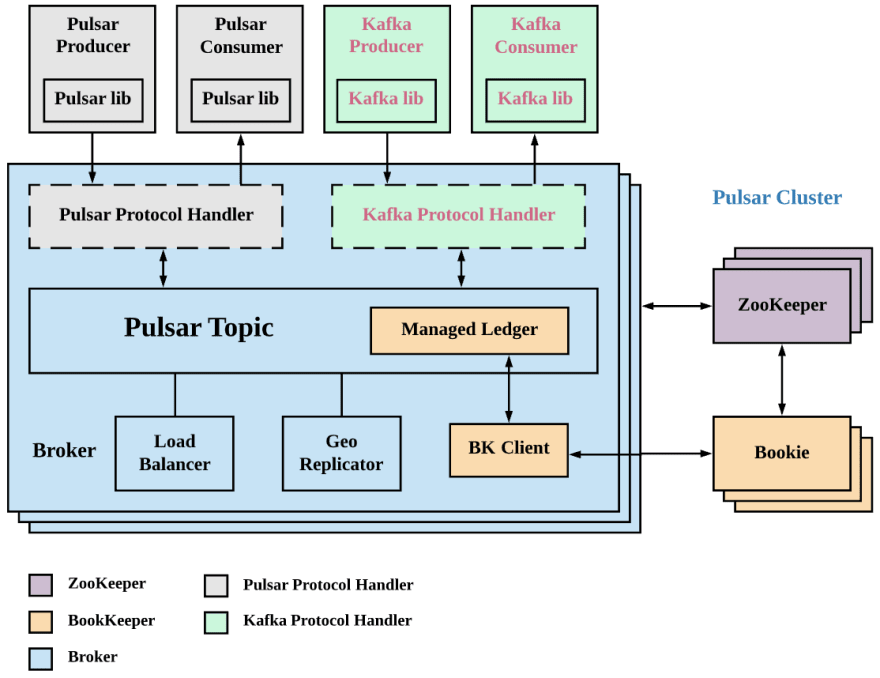
KoP is short for Kafka on Pulsar, and as the name implies, it is how to read and write Kafka data on Pulsar. KoP brings the Kafka Protocol Processing Plugin to the Pulsar Broker to make Apache Pulsar compatible with the Apache Kafka protocol. By adding the KoP protocol processing plugin to an existing Pulsar cluster, users can migrate existing Kafka applications and services to Pulsar without modifying the code.

The key features of Apache Pulsar are as follows:

  • Streamline operations with enterprise-class multi-tenancy features.
  • Avoid data relocation and simplify operations.
  • Persistently retain event streams with Apache BookKeeper and tiered storage.
  • Leverage Pulsar Functions for serverless event processing.

The KoP architecture is shown in the following diagram, which shows that KoP introduces a new protocol processing plugin that leverages existing components of Pulsar (e.g. Topic discovery, distributed logging repository-ManagedLedger, cursor, etc.) to implement the Kafka transport protocol.

Routine Load Subscribing to Pulsar Data

Apache Doris Routine Load supports accessing Kafka data to Apache Doris and guarantees transactional operations during data access. Apache Pulsar is positioned as a cloud-native era enterprise messaging publishing and subscription system that is already in use by many online services. So how do Apache Pulsar users access data to Apache Doris? The answer is through KoP.

Since Kop provides Kafka compatibility directly in Pulsar, so Plusar can be used like Kafka for Apache Doris, and the whole process can be done without task changes for Apache Doris to connect Pulsar data to Apache Doris and get the Routine Load's transactional guarantees

Practical operation

Pulsar installation environment preparation:

  • Download the Pulsar binary package and unzip:
#Download
wget https://archive.apache.org/dist/pulsar/pulsar-2.10.0/apache-pulsar-2.10.0-bin.tar.gz
#Unzip and enter the installation directory
tar xvfz apache-pulsar-2.10.0-bin.tar.gz
cd apache-pulsar-2.10.0

KoP Compilation and Installation:

  • Download KoP Source Code
git clone https://github.com/streamnative/kop.git
cd kop
  • Compiling KoP:
mvn clean install -DskipTests
  • Protocols configuration: Create the protocols folder in the unpacked apache-pulsar directory and copy the compiled nar package to the protocols folder.
mkdir apache-pulsar-2.10.0/protocols
# mv kop/kafka-impl/target/pulsar-protocol-handler-kafka-{{protocol:version}}.nar apache-pulsar-2.10.0/protocols
cp kop/kafka-impl/target/pulsar-protocol-handler-kafka-2.11.0-SNAPSHOT.nar apache-pulsar-2.10.0/protocols
  • View the results after adding:
[root@17a5da45700b apache-pulsar-2.10.0]# ls protocols/
pulsar-protocol-handler-kafka-2.11.0-SNAPSHOT.nar

Add KoP configuration:

  • Add the following configuration to standalone.conf or broker.conf
# Protocols to which KoP is adapted
messagingProtocols=kafka
# KoP's NAR file path
protocolHandlerDirectory=./protocols
# Whether to allow automatic topic creation
allowAutoTopicCreationType=partitioned
  • Add the following service listener configuration
# Use `kafkaListeners` here for KoP 2.8.0 because `listeners` is marked as deprecated from KoP 2.8.0 
kafkaListeners=PLAINTEXT://127.0.0.1:9092# This config is not required unless you want to expose another address to the Kafka client.
# If it’s not configured, it will be the same with `kafkaListeners` config by default
kafkaAdvertisedListeners=PLAINTEXT://127.0.0.1:9092
brokerEntryMetadataInterceptors=org.apache.pulsar.common.intercept.AppendIndexMetadataInterceptor
brokerDeleteInactiveTopicsEnabled=false

When the following error occurs:

java.lang.IllegalArgumentException: Broker has disabled transaction coordinator, please enable it before using transaction.

Add the following configuration to enable transactionCoordinatorEnabled

kafkaTransactionCoordinatorEnabled=true
transactionCoordinatorEnabled=true

This error must be fixed, otherwise you will see that data is produced and consumed on Pulsar using the tools that come with kafka: bin/kafka-console-producer.sh and bin/kafka-console-consumer.sh works fine, but in Apache Doris the data cannot be synchronized over.

Launch Pulsar
#bin/pulsar standalone
pulsar-daemon start standalone

Create Doris database and build tables

mysql -u root  -h 127.0.0.1 -P 9030
create database pulsar_doris;
#Switching databases
use pulsar_doris;
#Create clicklog table
CREATE TABLE IF NOT EXISTS pulsar_doris.clicklog
(
`clickTime` DATETIME NOT NULL COMMENT "clickTime",
`type` String NOT NULL COMMENT "clickType",
`id` VARCHAR(100) COMMENT "id",
`user` VARCHAR(100) COMMENT "user",
`city` VARCHAR(50) COMMENT "city"
)
DUPLICATE KEY(`clickTime`, `type`)
DISTRIBUTED BY HASH(`type`) BUCKETS 1
PROPERTIES (
"replication_allocation" = "tag.location.default: 1"
);

Creating Routine Load Tasks

CREATE ROUTINE LOAD pulsar_doris.load_from_pulsar_test ON clicklog
COLUMNS(clickTime,id,type,user)
PROPERTIES
(
"desired_concurrent_number"="3",
"max_batch_interval" = "20",
"max_batch_rows" = "300000",
"max_batch_size" = "209715200",
"strict_mode" = "false",
"format" = "json"
)
FROM KAFKA
(
"kafka_broker_list" = "127.0.0.1:9092",
"kafka_topic" = "test",
"property.group.id" = "doris"
);

The parameters in the above command are explained as follows:

  • pulsar_doris: The database where the Routine Load task is located
  • load_from_pulsar_test: Routine Load task name
  • clicklog:The target table for the Routine Load task
  • strict_mode: Whether the import is in strict mode, set to false here
  • format: The type of data to import, here configured as json
  • kafka_broker_list: Address of the kafka broker service
  • kafka_broker_list: kafka topic name, i.e. which topic to sync data on
  • property.group.id: Consumer group id

Data import and testing

  • Data Import

Construct a ClickLog data structure and call Kafka's Producer to send 50 million pieces of data to Pulsar.

The ClickLog data structure is as follows

public class ClickLog {
private String id;
private String user;
private String city;
private String clickTime;
private String type;
... //Omit getter and setter
}

The core code logic for message construction and delivery is as follows.

       String strDateFormat = "yyyy-MM-dd HH:mm:ss";
@Autowired
private Producer producer;
try {
for(int j =0 ; j<50000;j++){
int batchSize = 1000;
for(int i = 0 ; i<batchSize ;i++){
ClickLog clickLog = new ClickLog();
clickLog.setId(UUID.randomUUID().toString());
SimpleDateFormat simpleDateFormat = new SimpleDateFormat(strDateFormat);
clickLog.setClickTime(simpleDateFormat.format(new Date()));
clickLog.setType("webset");
clickLog.setUser("user"+ new Random().nextInt(1000) +i);
producer.sendMessage(Constant.topicName, JSONObject.toJSONString(clickLog));
}
}
} catch (Exception e) {
e.printStackTrace();
}
  • ROUTINE LOAD Task View

Execute SHOW ALL ROUTINE LOAD FOR load_from_pulsar_test \G; command to view the status of the import task.

mysql>  SHOW ALL ROUTINE LOAD FOR load_from_pulsar_test \G;
*************************** 1. row ***************************
Id: 87873
Name: load_from_pulsar_test
CreateTime: 2022-05-31 12:03:34
PauseTime: NULL
EndTime: NULL
DbName: default_cluster:pulsar_doris
TableName: clicklog1
State: RUNNING
DataSourceType: KAFKA
CurrentTaskNum: 1
JobProperties: {"partitions":"*","columnToColumnExpr":"clickTime,id,type,user","maxBatchIntervalS":"20","whereExpr":"*","dataFormat":"json","timezone":"Europe/London","send_batch_parallelism":"1","precedingFilter":"*","mergeType":"APPEND","format":"json","json_root":"","maxBatchSizeBytes":"209715200","exec_mem_limit":"2147483648","strict_mode":"false","jsonpaths":"","deleteCondition":"*","desireTaskConcurrentNum":"3","maxErrorNum":"0","strip_outer_array":"false","currentTaskConcurrentNum":"1","execMemLimit":"2147483648","num_as_string":"false","fuzzy_parse":"false","maxBatchRows":"300000"}
DataSourceProperties: {"topic":"test","currentKafkaPartitions":"0","brokerList":"127.0.0.1:9092"}
CustomProperties: {"group.id":"doris","kafka_default_offsets":"OFFSET_END","client.id":"doris.client"}
Statistic: {"receivedBytes":5739001913,"runningTxns":[],"errorRows":0,"committedTaskNum":168,"loadedRows":50000000,"loadRowsRate":23000,"abortedTaskNum":1,"errorRowsAfterResumed":0,"totalRows":50000000,"unselectedRows":0,"receivedBytesRate":2675000,"taskExecuteTimeMs":2144799}
Progress: {"0":"51139566"}
Lag: {"0":0}
ReasonOfStateChanged:
ErrorLogUrls:
OtherMsg:
1 row in set (0.00 sec)
ERROR:
No query specified

From the above results, we can see that totalRows is 50000000 and errorRows is 0. It means that the data is imported into Apache Doris without any loss or redundancy.

  • Data Validation Execute the following command to count the data in the table and find that the result is also 50000000, as expected.
mysql> select count(*) from clicklog;
+----------+
| count(*) |
+----------+
| 50000000 |
+----------+
1 row in set (3.73 sec)
mysql>

Conclusion

With KoP, we have been able to seamlessly integrate Apache Pulsar data into Apache Doris without any modifications to the Routine Load task and guarantee transactional nature of the data import process. In the meantime, the Apache Doris community has initiated the design of native import support for Apache Pulsar, and it is believed that it will soon be possible to directly subscribe to message data in Pulsar and guarantee Exactly-Once semantics during the data import process.

Tech Insights

With the increasing demand for real-time analysis, the timeliness of data is becoming more and more important to the refined operation of enterprises. With the massive data, real-time data warehouse plays an irreplaceable role in effectively digging out valuable information, quickly obtaining data feedback, helping companies make faster decisions and better product iterations.

In this situation, Apache Doris stands out as a real-time MPP analytic database, which is high performance and easy to use, and supports various data import methods. Combined with Apache Flink, users can quickly import unstructured data from Kafka and CDC(Change Data Capture) from upstream database like MySQL. Apache Doris also provides sub-second analytic query capabilities, which can effectively satisfy the needs of several real-time scenarios: multi-dimensional analysis, dashboard and data serving etc.

Challange

Usually, there are many challenges to ensure high end-to-end concurrency and low latency for real-time data warehouses , such as:

  • How to ensure end-to-end data sync in second-level ?
  • How to quickly ensure data visibility ?
  • How to solve the problem of small files writing under high concurrency situation?
  • How to ensure end-to-end Exactly-Once?

Within the challenges above , we conducted an in-depth research on the business scenarios of users using Flink and Doris to build real-time data warehouses . After grasping the pain points of users, we made targeted optimizations in Doris version 1.1 and greatly improved the user experience and improved the stability. The resource consumption of Doris has also been greatly optimized.

Optimization

Streamming Write

The initial practice of Flink Doris Connector is to cache the data into the memory batch after receiving data.The method of data writing is saving batches, and using parameters such as batch.size and batch.interval to control the timing of Stream Load writing at the same time.

It usually runs stably when the parameters are reasonable. Whatever the parameters are unreasonable, it would cause frequent Stream Load and compaction untimely, resulting in excessive version errors ( -235 ). On the other hand, when there is too much data, in order to reduce the writing frequency of Stream Load , the setting of batch.size too large may also cause OOM.

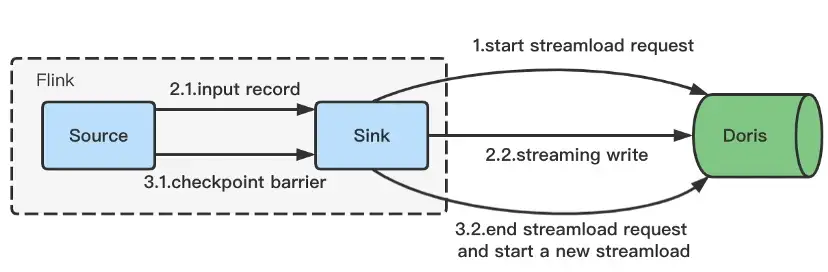
To solve this problem, we introduce streaming write:

  • After the Flink task starts, the Stream Load Http request will be asynchronously initiated.
  • When the data is received, it will be continuously transmitted to Doris through the Chunked transfer encoding of Http.
  • Http request will end at Checkpoint and complete the Stream Load writing . The next Stream Load request will be asynchronously initiated at the same time.
  • The data will continue to be received and the follow-up process is the same as above.

The pressure on the memory of the batch is avoided since the Chunked mechanism is used to transmit data. And the timing of writing is bound to the Checkpoint, which makes the timing of Stream Load controllable, and provides a basis for the following Exactly-Once semantics.

Exactly-Once

Exactly-Once means that data will not be reprocessed or lost, even machine or application failure. Flink supports the End-to-End’s Exactly-Once scenario a long time ago, mainly through the two-phase commit protocol to realize the Exactly-Once semantics of the Sink operator.

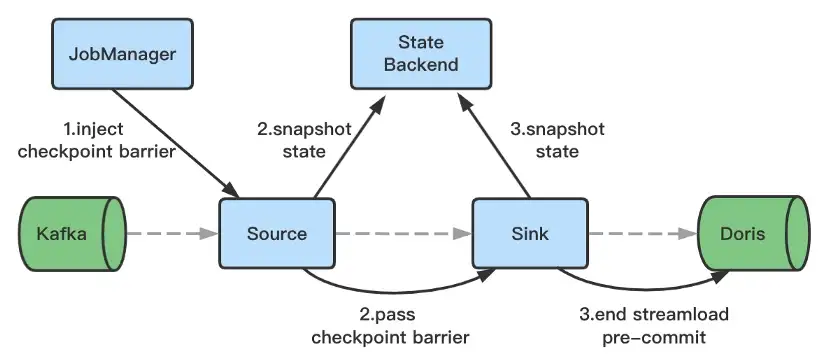
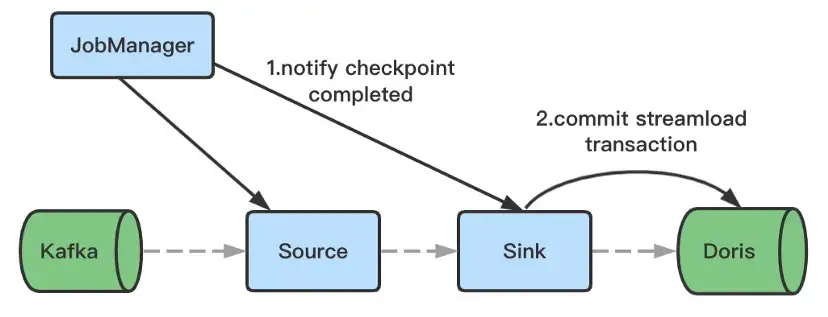
On the basis of Flink’s two-stage submission, with the help of Doris 1.0’s Stream Load two-stage submission,Flink Doris Connector implements Exactly Once semantics. The specific principles are as follows:

  • When the Flink task is started, it will initiate a Stream Load PreCommit request. At this time, a transaction will be opened first, and data will be continuously sent to Doris through the Chunked mechanism of Http.

  • Http request will be completed when the data writing ends at Checkpoint , and set the transaction status to preCommitted. The data has been written to BE and is invisible to the user at this time.

  • A Commit request will be initiated after the Checkpoint, and the transaction status will be set to Committed. The data will become visible to the user after request.

  • After the Flink application ends unexpectedly and restarts from Checkpoint, if the last transaction was in the preCommitted state, a rollback request will be initiated and the transaction state will be set to Aborted.

Based on the above , Flink Doris Connector can be used to realize real-time data storage without loss or weight.

Second- Level Data Synchronization

End-to-end second-level data sync and real-time visibility of data in high concurrent write scenarios require Doris to have the following capabilities:

  • Transaction Processing Capability

Flink real-time writing interacts with Doris in the form of Stream Load 2pc, which requires Doris to have the corresponding transaction processing capabilities to ensure the basic ACID characteristics, and support Flink’s second-level data sync in high concurrency scenarios.

  • Rapid Aggregation Capability of Data Versions

One import in Doris will generate one data version. In a high concurrent write scenario, an inevitable impact is that there are too many data versions, and the amount of data imported in a single time will not be too large. The continuous high-concurrency small file writing scenario extremely tests the real-time ability and Doris’ data merging performance, which is not friendly to Doris, and in turn affects the performance of the query. Doris has greatly enhanced the data compaction capability in version 1.1, which can quickly complete the aggregation of new data, avoiding -235 errors and query efficiency problems which are caused by too many versions of sharded data.

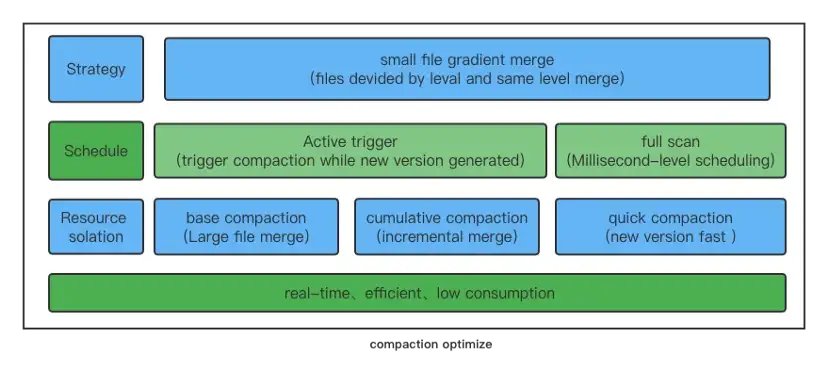
First of all, in Doris 1.1 version, QuickCompaction was introduced, which can actively triggered Compaction when the data version increased. At the same time, by improving the ability to scan fragment meta information, fragments that need to be compacted can be quickly discovered and trigger Compaction. Through active triggering and passive scanning, the real-time problem of data merging is completely solved.

For high-frequency small file Cumulative Compaction, the scheduling and isolation of Compaction tasks is implemented to prevent the heavyweight Base Compaction from affecting the merging of new data.

Finally, the strategy of merging small files is optimized by adopting gradient merge method. Each time the files participating in the merging belong to the same data magnitude,which can prevent versions with large differences in size from merging, and gradually merges hierarchically, reducing the number of times a single file is involved in merging, which can greatly save the CPU consumption of the system.

Doris version 1.1 has made targeted optimizations for scenarios such as high concurrent import, second-level data sync, and real-time data visibility, which greatly increases the ease of use and stability of the Flink system and Doris system, saves the overall resources of the cluster.

Effect

General Flink High Concurrency Scenarios

In the general scenario of the survey, Flink is used to synchronize unstructured data in upstream Kafka. The data is written to Doris in real time by the Flink Doris Connector after ETL.

The customer scenario is extremely strict here. The upstream maintains a high frequency of 10w per second, and the data needs to be able to complete the upstream and downstream sync within 5s to achieve second-level data visibility. Flink is configured with 20 concurrency, and the Checkpoint interval is 5s. The performance of Doris version 1.1 is quite excellent.

Specifically reflected in the following aspects:

  • Compaction Real-Time

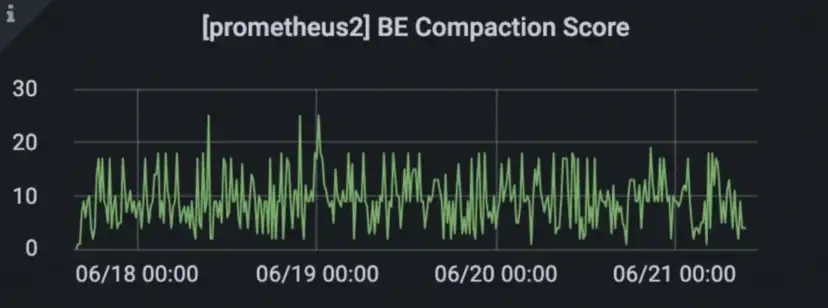
Data can be merged quickly, the number of tablet data versions is kept below 50, and the compaction score is stable. Compared with the previous -235 problem in high concurrent import scenario, the compaction efficiency is improved more than 10 times.

  • CPU Resource Consumption

Doris version 1.1 has optimized the strategy for compaction of small files. In high-concurrency import scenarios, CPU resource consumption is reduced by 25%.

  • QPS Query Delay is Stable

By reducing the CPU usage and the number of data versions, the overall order of data has been improved, and the delay of SQL queries will be reduced.

Second-Level Data Synchronization Scenario (Extreme High Pressure)

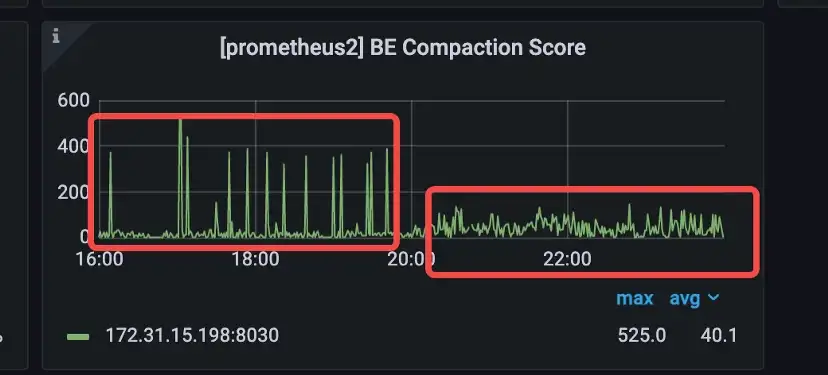
In single bet and single tablet with 30 concurrent limit stream load pressure test on the client side, data in real-time <1s, the comparison before and after compaction score optimization as below:

Real-Time Data Visualization Scenario

For strict latency requirements scenarios, such as second-level data synchronization, usually mean that a single import file is small, and it is recommended to reduce cumulative_size_based_promotion_min_size_mbytes . The default unit is 64 MB, and you can set it to 8 MB manually, which can greatly improve the compaction real-time performance.

High Concurrency Scenario

For high concurrent writing scenarios, you can reduce the frequency of Stream Load by increasing the checkpoint interval. For example, setting checkpoint to 5–10s can not only increase the throughput of Flink tasks, but also reduce the generation of small files and avoid causing compaction more pressure.

In addition, for scenarios that do not require high real-time data, such as minute-level data sync, the checkpoint interval can be increased, such as 5–10 minutes. And the Flink Doris connector can still ensure the integrity of data through the two-stage submission and checkpoint mechanism.

Future Planning

  • Real-time Schema Change

When accessing data in real time through Flink CDC, the upstream business table will perform the schema change operation, it has to modify the schema manually in Doris and Flink tasks. In the end, the data of the new schema can be synchronized after restart the task .

This way requires human intervention, which will bring a great operation burden to users. In subsequent versions, real-time schema changes will support CDC scenarios, and the upstream schema changes will be synchronized to the downstream in real-time, which will comprehensively improve the efficiency of schema changes.

  • Doris Multi-table Writting

At present, the Doris Sink operator only supports synchronizing a single table, so for the entire database, it still has to divide the flow manually at the Flink level and write to multiple Doris Sinks, which will increase the difficulty of developers. In subsequent versions, we will support a single Doris Sink to synchronize multiple tables, which greatly simplifies the user’s operation.

  • Adaptive Compaction Parameter Tuning

At present, the compaction strategy has many parameters, which can play a good role in most general scenarios, but these strategies still can’t play an efficient role in some special scenarios. We will continue to optimize in subsequent versions, carry out adaptive compaction tuning for different scenarios, and keep improving data merging efficiency and real-time performance in various scenarios.

  • Single-Copy Compaction

The current compaction strategy is that each BE is carried out separately. In subsequent versions, we will implement single-copy compaction, and realize compaction tasks by cloning snapshots, reduce system load while reducing about 2/3 compaction tasks of the cluster, leaving more system resources to the user side.